Plan around your energy,
not the clock.
Oqira asks first: how much power do you have today? It builds the plan around the energy you actually have, helps you start with a single focus window — on your Mac and in your pocket — and closes the day without a guilt list. For “high” days and for “minimal” days.
macOS 11+Apple Silicon & Intel63 MBv0.2.0
Scenes advance on their own — or click to switch
First testimonials will land here when users are ready to share. For now: anyone who downloads before v1.0 gets Pro free forever (100 spots).
Problem
Classic to-do lists don't work when your brain doesn't start itself.
47 tasks long
You open Notion in the morning, see 47 tasks, and close it instantly. Decision paralysis isn't laziness — it's missing an interface that says "this, now".
The distraction loop
One click on Twitter. 45 minutes later you don't remember what you were doing. Plus 23 minutes to recover focus after every switch.
The day dissolves
At 6pm: “what did I actually do today?” Without closing the day, guilt accumulates — and the next morning is even worse.
What Oqira is NOT
Other tools organize work. Oqira executes it.
It's the only app that starts your brain, blocks distractions, and closes the day with a report — in one native tool, no SaaS.
- Notion won't block Twitter
- Todoist won't pick what's next
- RescueTime only tells you what you wasted
- Forest doesn't know what you're doing
How it works
Three moments of the day. No mess in between.
Scenes advance on their own — or click to switch
Morning — plan in 90 seconds
Answer 3 questions (energy / stress / sleep), Oqira takes your tasks and arranges focus blocks + breaks for today. Max 3 priorities. The rest waits.
During the day — one task on screen
You only see the current focus block and timer. Open Twitter → red overlay + reminder of what you're doing. Everything else is invisible.
Evening — closure + AI report
Oqira shows what you did and where you got lost. Once a day the AI looks at 14 days of data and writes a narrative report: weakest hours, most common distractions, concrete recommendations for tomorrow.
Features
Designed for brains that need external scaffolding.
Focus orb with a timer
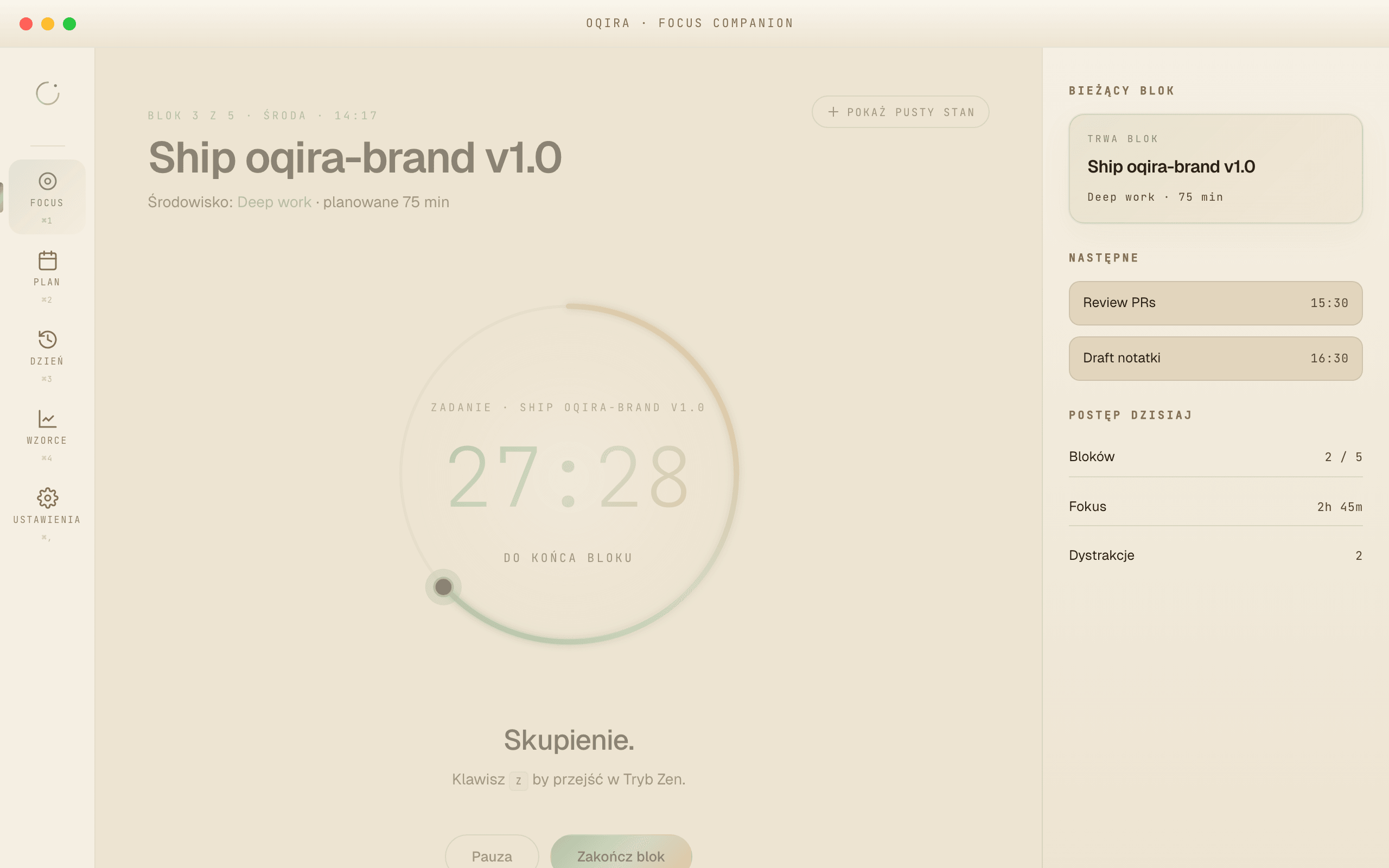
One orb, one time, one task. A large timer counts down the focus window and an energy bar shows how much you have today — nothing but what you’re on right now.
A day planned around energy
Start from a single question: how much do you have today? Focus windows and their length adapt to your energy (high / normal / low / minimal). A worse day needs no apology.
Mac ↔ iPhone, live
Start a focus window on Mac and your iPhone knows in under half a second — the same time on both. On iOS the current window shows in Live Activity and Dynamic Island — no need to pull out your phone.
Menu bar widget
Oqira lives in the macOS menu bar, not the Dock. A click opens a compact popover with the timer and current task — your whole focus at hand, no window juggling.
Deep Focus · distraction friction
Inside a focus window, sites on Mac and selected apps on iPhone get friction that breaks the reflex — a second of pause instead of a spiral, not a prison. A Pro plan feature.
Calm, non-judgmental design
Sage & sand, lots of breathing room, no red alarms. Gentle nudges (Gentle / Direct / Coaching) bring you back — a reminder, not a reproach.
AI arranges your plan
Not sure where to start? The AI lays your tasks into windows around today’s energy. Accept, tweak, or arrange your own way — it’s a suggestion, not an order.
End-of-day closure
An evening recap of what you got done and a gentle plan for tomorrow. Instead of guilt — a clean, lighter start the next morning.
Insight without judgment
Focus score and a distraction map show where attention drifts. It’s data, not blame — to understand yourself, not punish yourself.
This is what it looks like
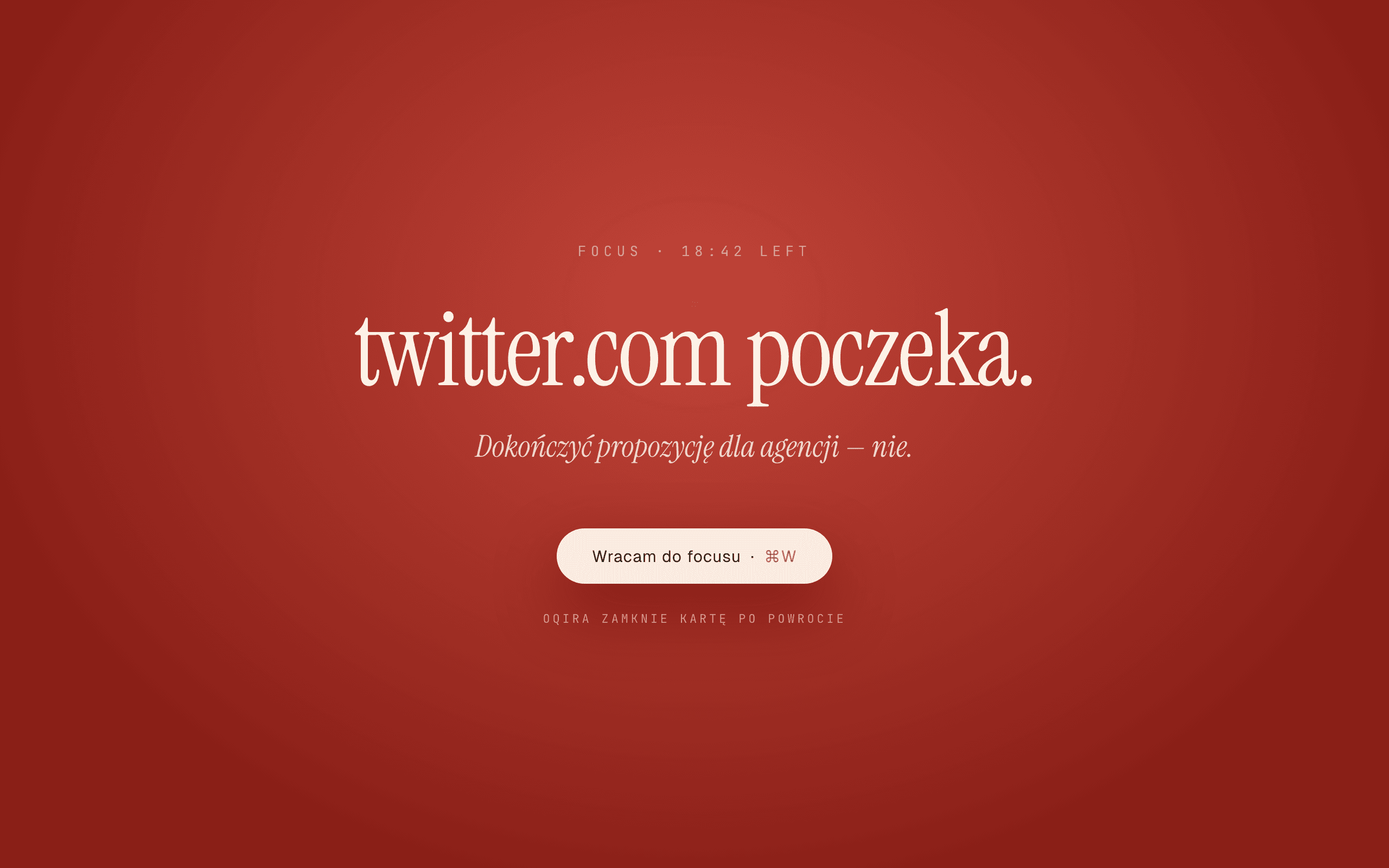
Open Twitter mid-focus? Screen slams shut.
Not a warning. Not a notification. Not a top bar you can ignore. Full-screen overlay with the name of your current task and one button: “Back to it”.
Blocking works at the system level — it can't be bypassed in incognito or another browser.
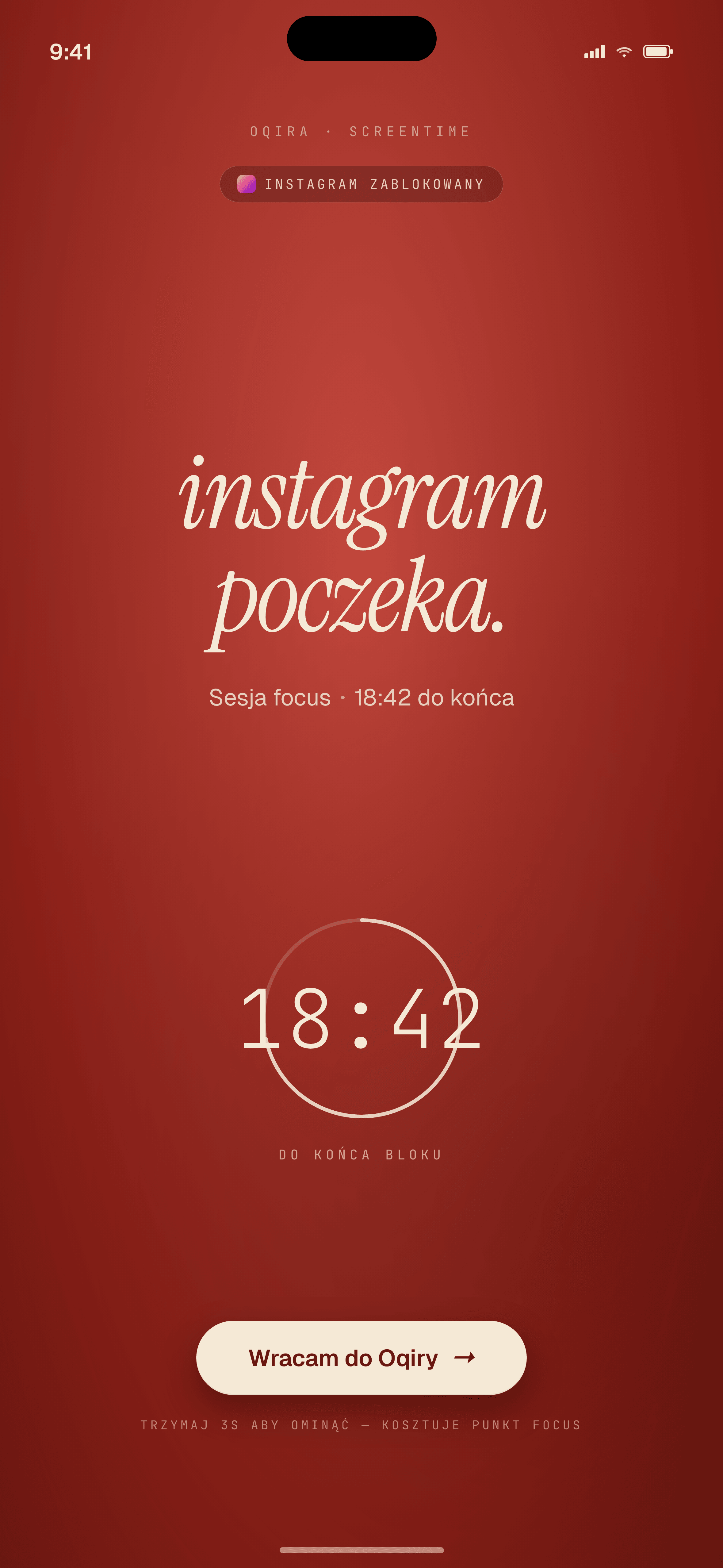
Mac ↔ iPhone
Start focus on Mac. iPhone reacts in half a second.
Most focus apps check state every 5–30 seconds. Oqira reacts in real time — when you hit “Start” on Mac, iPhone automatically silences notifications and blocks chosen apps (Instagram, TikTok, Facebook) before you reach into your pocket.
- Under half a secondChanges reach both devices right away, instead of waiting for a periodic check.
- Native iOS Screen TimeUses Apple Screen Time — system-level blocking that can't be bypassed in Safari.
- Wakes a sleeping phoneA quiet background signal wakes the app before you open Instagram — even if your iPhone was idle for an hour.
- Cleans up after itselfMac crashed? After about a minute of silence, iPhone goes back to normal and unblocks apps. No manual cleanup.
Download
One app. One installer. No account, no App Store.
Oqira works locally — your tasks, focus data, and day plan never leave your Mac. Automatic updates are built in, so new versions appear on their own.
First run on macOSWhere to find the app after install, and what to do if macOS ever warns you
- 1InstallOpen the downloaded .dmg and drag the Oqira icon to your Applications folder.
- 2Open — no warningsIn Applications, double-click Oqira. It opens normally, no prompts — the app is signed and verified by Apple.
- 3Look in the menu bar, not the DockOqira lives in the top menu bar — it doesn't show in the Dock or Cmd+Tab. The brain icon sits in the top bar.
Remove the quarantine flag in Terminal:
xattr -dr com.apple.quarantine /Applications/Oqira.appOqira is signed and verified by Apple, so it opens normally with one click. If a warning ever appears (e.g. after downloading via an unusual browser), just right-click → Open — standard for apps outside the App Store.
Roadmap
What's shipping and when
Solo dev, ~20h weekly. Dates are realistic (not ambitious) — I'd rather deliver than promise.
- Q4 2025v0.1 macOS — first public releaseDay plan, focus blocks, site blocking, daily review, AI report.
- Q1 2026· in progressv0.2 — iPhone sync (TestFlight)ScreenTime shield on the phone, native push in <500ms when you start focus on Mac.
- Q2 2026· in progressv0.5 — verified by Apple + App StoreSigned and verified by Apple, no more security warnings on install. iOS companion in the App Store.
- Q3 2026v1.0 — stable macOS + Windows releaseFirst paid tier (Pro). Early users keep free Pro forever.
- Q4 2026v1.x — Linux (.AppImage + .deb)Ubuntu, Fedora, Arch. The same experience as macOS.
FAQ
Questions I hear most often before download
Exceptions:
- The AI report sends a 14-day summary once a day over a secure, encrypted channel (focus score, most common distractions — no task content) to an external AI service. You can turn it off in settings.
- iPhone sync (optional) — focus state goes through our server, but only whether focus is on and when it started — with no task names.
Missing something? hello@oqira.app — I reply personally within 24h.
Waitlist
No Mac, or waiting for an update? Leave your email.
I'll write when your platform is ready or when a new version ships something big. Max 1 email per month, zero spam, easy unsubscribe.
Stop planning productivity.
Start having it.
Oqira is a one-person tool. Single-user, local on your Mac. Zero tracking, zero data selling, no cloud middleman.